Cost-saving (token compression)
Turn on token-compression to cut what your agent sends to the model provider on long runs.
- Cost-saving toggle
- Runs on your own machine
- Prompts compressed in transit
- Credited back to the session
On long autonomous runs, prompt tokens add up fast. Turn on cost-saving for a session and CodeAgent starts a local compression step on your own machine that shrinks prompt tokens before they're sent to the model provider — the agent keeps working exactly as before, it just costs less. Savings are reported back to the app so you can see what it's saving over time.
Prompt tokens are compressed before they reach the model provider, right on the machine the agent already runs on.
Enabling shows each step as it happens — setup, configuration, activation — so it's never a silent wait.
Token savings are tracked and credited back to the session, visible right in the app.
Turning it off restores your agent to talking to the provider directly — the compression package stays installed so re-enabling is fast.
- 1Open Session add-ons
From a session, open the kebab menu and choose Session add-ons.
- 2Turn on Cost-saving
Watch the setup steps as compression installs and starts on your machine.
- 3Keep working
Your agent runs exactly as before — prompts are compressed in the background.
- 4Check your savings
See what the session has saved, and disable anytime with one tap.
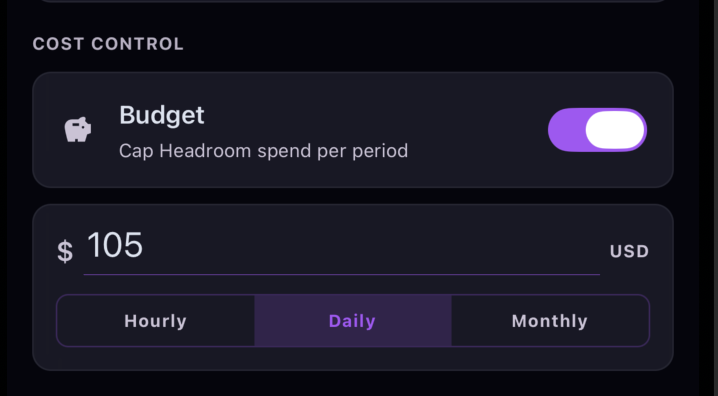
Beyond compressing tokens, you can put a hard budget on how much cost-saving is allowed to spend — so a long autonomous run can never quietly run up the bill. Under Cost Control, turn on Budget, set an amount, and pick the period.
Toggle Budget on to cap how much cost-saving can spend per period — off by default, so there's no cap until you set one.
Enter a dollar amount and choose the reset cadence: Hourly, Daily, or Monthly.
The app tracks your spend against the cap and warns you as you get close, then notifies you when the budget is reached.
Cost-saving is a PRO feature, and only available on sessions where your agent runs on a machine CodeAgent can configure — local, Codespace, or self-hosted.
FAQ
Related
Ready to try it?