Conversation history
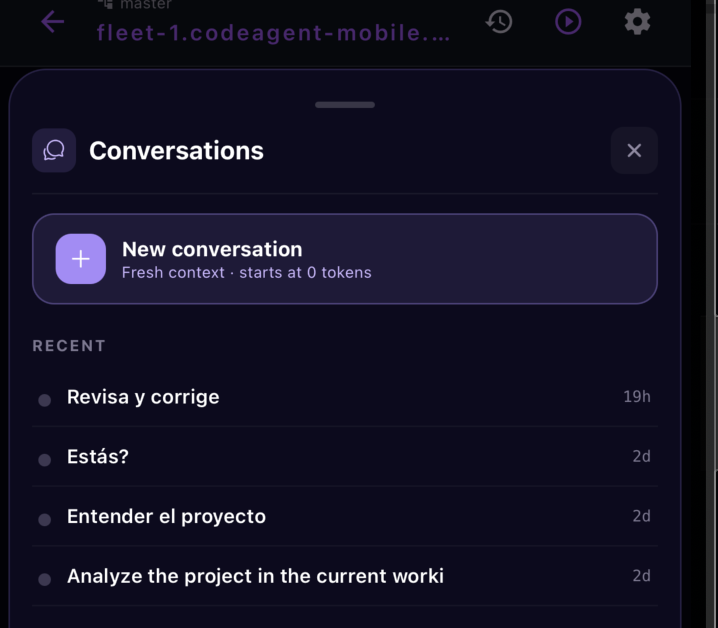
Jump back into a past conversation, or start a fresh one at zero tokens — right from the session.
- From the session header
- A recent thread, or fresh context
- Same agent, chosen context
A session isn't a single endless thread. Open the Conversations sheet from the session header to see your recent conversations — each with its title and when you last touched it — and either pick up where you left off or start clean.
Start fresh with a clean context window — "starts at 0 tokens" — when you're switching to unrelated work.
Your recent conversations are listed with an auto-generated title and how long ago you last used each.
Rename a conversation to something memorable, or delete ones you no longer need.
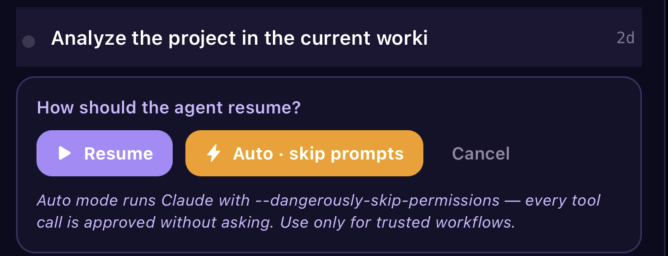
Tapping a recent conversation asks how the agent should resume — because one of the choices changes how tool calls are approved:
Continue the conversation normally — the agent still asks before it acts, as usual.
Resume in auto-approve mode: every tool call runs without asking (Claude's --dangerously-skip-permissions). Fast, but reserve it for workflows you trust.
Back out without resuming if you picked the wrong thread.
FAQ
Related
Ready to try it?